In the world of modern stagecraft, versatility and responsiveness are key. As lighting designers strive to deliver increasingly dynamic and responsive shows, many are turning to MIDI controllers as a customizable and cost-effective interface for real-time lighting control. Whether it’s triggering cues, fading scenes, or manipulating effects live, integrating MIDI controllers with lighting software opens up new levels of creative control.
This article explains how MIDI interfaces work with lighting platforms, what benefits they offer, and how to set up a reliable, performance-ready system.
What Is MIDI and Why Use It in Lighting?
MIDI (Musical Instrument Digital Interface) is a protocol developed in the 1980s for electronic music gear. Unlike audio signals, MIDI transmits digital control messages—such as note on/off, velocity, knob movement, or pedal values—over a standard 5-pin DIN or USB connection.
Why has MIDI become relevant in lighting?
Customizable physical controls (knobs, faders, buttons, pads)
Affordable hardware options, from $50 to $500
High-resolution and low-latency response
Standardized protocol, supported by most professional lighting platforms
From DJs syncing lighting with beats to theater operators triggering light cues alongside sound effects, MIDI brings physical immediacy to digital lighting systems.
Compatible Lighting Software That Supports MIDI
Many popular lighting software platforms now support MIDI natively or via external mapping tools. These include:
| Lighting Platform | MIDI Support Notes |
|---|
| GrandMA2/3 | Via MIDI In ports or with MIDI nodes (commands and faders) |
| Lightkey | Full MIDI Learn interface, supports controllers directly |
| QLC+ | Free software with extensive MIDI mapping support |
| Onyx (Obsidian) | Built-in MIDI mapping tool with cue triggering |
| Chamsys MagicQ | Requires external MIDI interface and mapping setup |
| Resolume Arena | Though a video tool, often used for AV-light integration |
Typical Uses of MIDI in Lighting Control
MIDI controllers can augment lighting control in many creative and technical ways:
1. Scene Triggering
Use pads or buttons to instantly activate preprogrammed scenes, such as:
“Intro Look”
“Chorus Wash”
“Strobe Hit”
Each button corresponds to a MIDI note, which lighting software interprets as a cue command.
2. Live Intensity or Effect Fading
Assign faders to:
Many designers assign fader banks to intensity levels while still maintaining DMX control in the background.
3. Effect Parameter Tweaks in Real Time
Knobs can adjust:
Gobo rotation speed
Prism spin direction
Strobe rate
Zoom or focus range
This tactile interaction allows a VJ- or DJ-like feel during live performance, especially for EDM or club shows.
4. Timecode and Synchronization Control
MIDI clock and transport commands can:
Sync light shows to DAWs (Ableton Live, Logic Pro)
Trigger timecoded cue stacks
Start/stop chases and loops
This is particularly useful for hybrid AV performances where sound, light, and video must move together.
Setting Up MIDI with Lighting Software
Here's how to integrate MIDI into your lighting workflow:
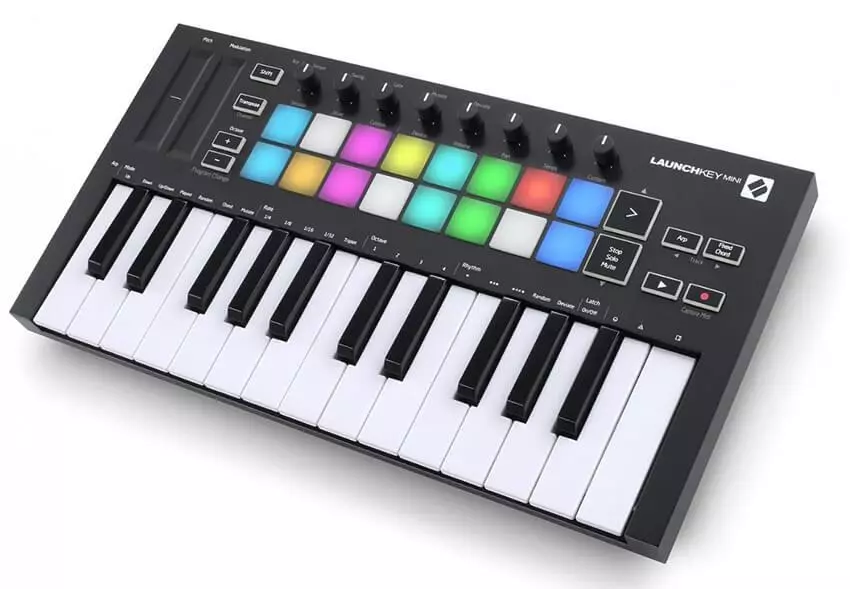
Step 1: Choose a Compatible MIDI Controller
Popular models include:
Akai APC Mini / MPD218
Novation Launchpad / Launch Control
Korg nanoKONTROL
Behringer X-Touch / BCF2000
Native Instruments Komplete Kontrol
Choose based on the physical controls you need—pads for cue triggering, faders for dimming, knobs for FX.
Step 2: Connect and Identify MIDI Devices
Connect via USB or through a MIDI interface (for 5-pin DIN controllers)
In lighting software, locate MIDI device under “MIDI Inputs” or “Control Settings”
Confirm signal reception via MIDI monitor or diagnostic tab
Step 3: Map MIDI to Lighting Functions
Most software supports one or more of the following mapping methods:
MIDI Learn: Click a function in the software, then move the controller to auto-map
Manual Mapping: Assign control numbers (e.g., CC#1 for dimmer)
OSC Bridge Integration: Convert MIDI to OSC for more advanced mapping in systems like TouchDesigner or LightJams
Step 4: Save, Test, and Label
Test each assigned controller element
Label physical controls with tape or stickers
Save preset templates for quick recall in future shows
Tips for Reliable MIDI-Lighting Integration
Avoid USB hubs with unpowered ports (may cause signal dropouts)
Use MIDI feedback where supported (some software lights up pads when scenes are active)
Monitor latency in live triggering—especially for cue stack transitions
Back up your MIDI map files separately from show files
Assign logical banks or layers for large shows (e.g., Bank 1 = Front Wash, Bank 2 = FX)
READ MORE:



