Live streaming has become one of the most powerful ways to connect with audiences, whether you're a content creator, educator, gamer, or business professional. While cameras and microphones often get most of the attention, lighting is the true secret behind a polished and professional-looking stream. LED lighting can transform any ordinary space into a dynamic on-camera environment.
In this guide, we'll explore how to set up a compact live streaming studio using LED lighting. We'll cover three key aspects:
Compact Lighting: How to arrange ring lights and ambient Par lights in a desktop streaming space.
Skin Tone Accuracy: Choosing warm color temperature LEDs to enhance your complexion.
Low Heat Advantage: Why LED lights are ideal for long streaming sessions.
By the end, you'll have practical tips to build a professional-looking background, improve on-camera presence, and create a more engaging experience for your audience.
1. Compact Lighting: How to Arrange Ring Lights and Ambient Par Lights
When space is limited, every piece of equipment in your streaming setup should serve a purpose. The combination of a ring light and Par lights can deliver a balanced, professional look without requiring a large studio.
The Role of Ring Lights
Key Light Source
A ring light placed in front of the streamer provides even, shadow-free illumination. Its circular design creates a natural catchlight in the eyes, making you look more lively on camera.
Placement Tips
Position the ring light at eye level and about 50–70 cm (20–28 inches) away from your face. Adjust brightness to avoid overexposure.
The Role of Ambient Par Lights
Background Enhancement
LED Par lights are perfect for adding color and depth to your background. They can wash the wall, highlight shelves, or create a gradient effect.
Placement Tips
Place Par lights behind you, angled toward the wall rather than the camera. This creates separation between you and the background, making the scene more visually appealing.
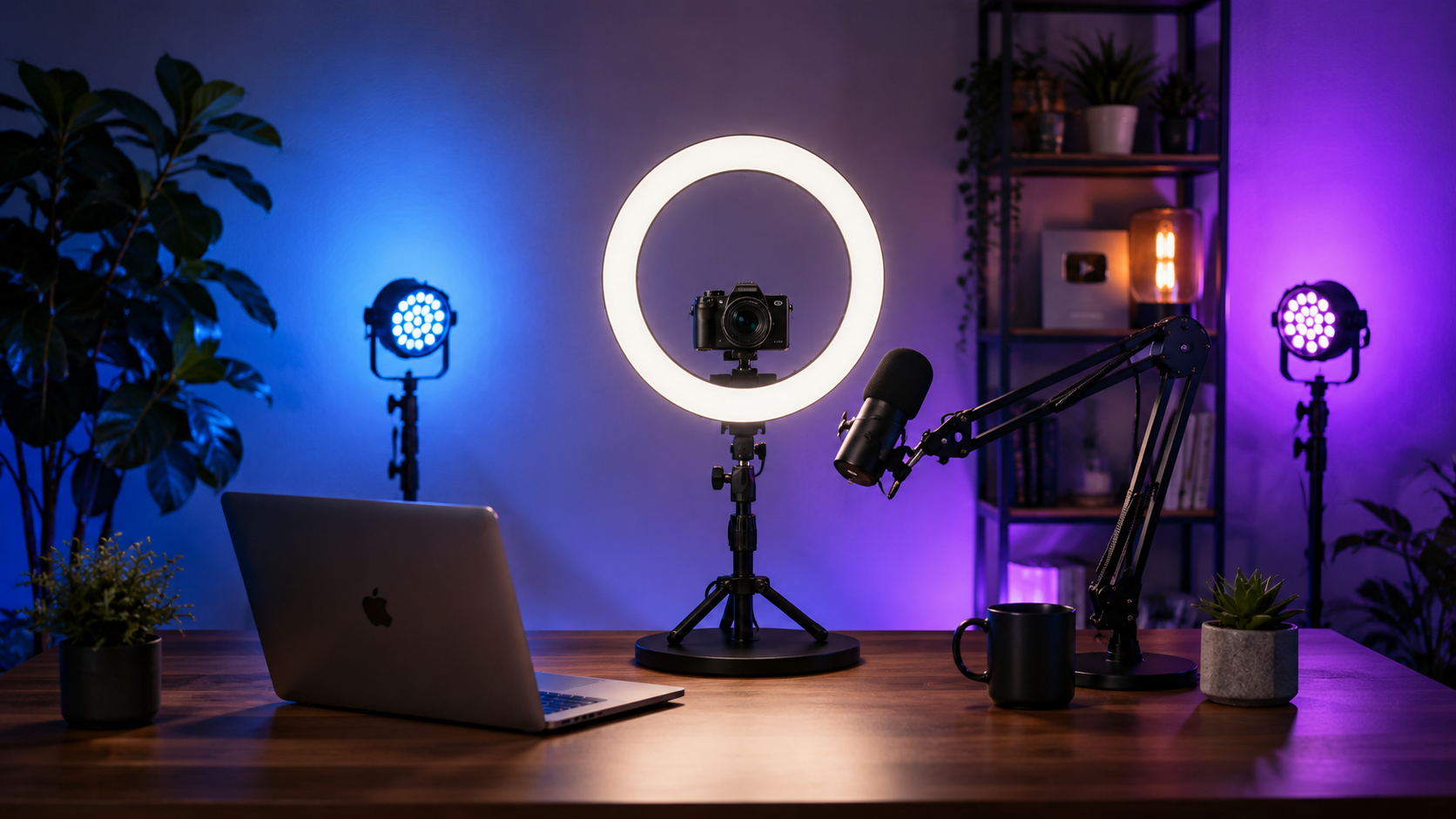
Example Layout for a Desktop Studio
Front: Ring light as the primary key light.
Back Left & Right: Two Par lights with soft colors (e.g., blue and purple) for ambient effects.
Optional: Add a small LED strip under the desk or shelf for extra dimension.
2. Skin Tone Accuracy: Choosing Warm Color Temperature LEDs

Good lighting isn't just about brightness — it's about color quality. The color temperature of your LED lights plays a huge role in how your skin looks on camera.
Why Warm Light Works Best
Natural Complexion
Warm LEDs (around 2700K–3500K) mimic natural indoor lighting, giving your skin a healthy, flattering tone.
Reduces Harshness
Cooler lights (5000K–6500K) can make skin look pale or even create unflattering shadows.
Mood and Comfort
Warm lighting creates a welcoming atmosphere, helping your audience feel more connected.
Tips for Achieving the Best Skin Tone
Use a ring light with adjustable color temperature.
Combine warm key light with cooler background lights for contrast.
Avoid overhead lighting, which can create unflattering shadows under your eyes.
3. Low Heat Advantage: Why LED Lights Are Ideal for Long Streaming Sessions
LED lighting is becoming the preferred solution for modern streaming studios because it provides professional brightness while generating much less heat than traditional lighting systems.
For creators who stream for several hours every day, a comfortable working environment is essential. LED fixtures help maintain a cooler studio temperature while reducing energy consumption.
Benefits of Low-Heat LED Lighting
Comfortable Long-Term Use
LED lights produce less heat, allowing streamers to work comfortably during extended broadcasts.
Energy Efficiency
Compared with traditional lighting equipment, LED fixtures consume less power while delivering stable and high-quality illumination.
Longer Equipment Life
Lower operating temperatures also help improve product durability and reduce maintenance requirements.
Creating a Professional LED Streaming Environment
A successful live streaming studio requires more than just a bright light. The goal is to create a balanced environment where the subject, background, and camera work together.
A professional setup usually includes:
Front lighting: Provides clear facial illumination.
Background lighting: Adds depth and atmosphere.
Accent lighting: Creates a unique visual identity.
With the right combination of ring lights and LED Par lights, even a small room can become a professional streaming space.
Conclusion
A professional live streaming environment starts with effective lighting design. By combining compact LED solutions, accurate color temperature control, and low-heat technology, creators can achieve better image quality and a more comfortable working experience.
Whether you are building a home studio, recording online courses, streaming games, or creating professional video content, LED lighting provides the flexibility and performance needed for modern content production.